
Microprocessor vs Microcontroller: Key Differences and Uses
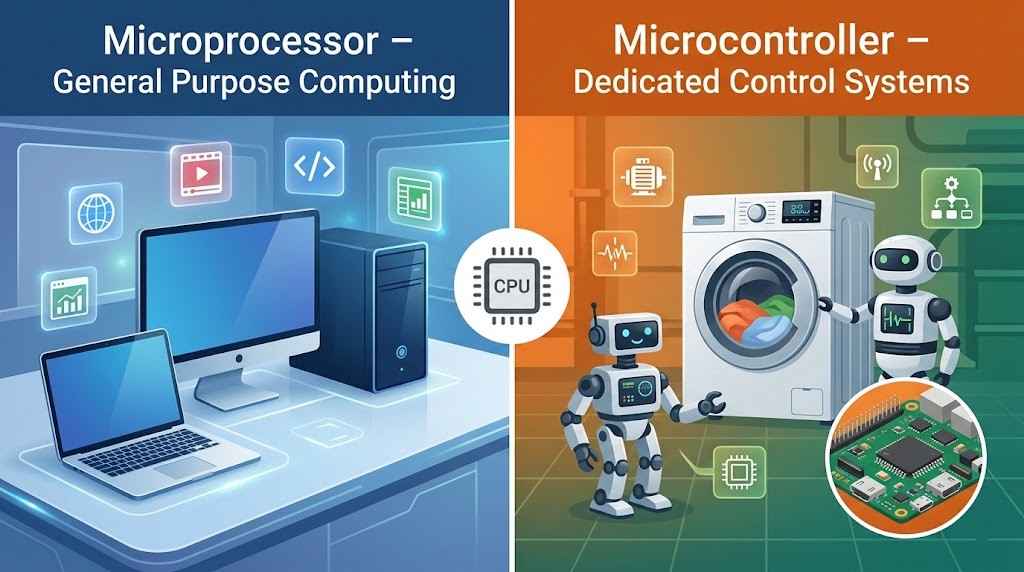
A chip that runs a touchscreen interface may be a poor fit for a sensor that must sleep for months. More processing power doesn’t automatically make it the better choice.
The microprocessor vs microcontroller decision usually comes down to integration, memory, software, and the job you need done. A microcontroller often brings control hardware and useful memory together; an application microprocessor commonly supports a larger software environment.
What do MCU and MPU mean?
Microcontroller: integration for control
A microcontroller, or MCU, commonly combines CPU cores, program memory, RAM, and peripherals such as timers, ADCs, and communication interfaces. That makes it useful for compact control systems.
A thermostat is a typical example. It reads temperature, checks a setting, and operates an output. The application may fit into a simple program or an RTOS.
Microprocessor: a processing platform
A microprocessor, or MPU, provides processing resources for an application. Many application MPUs use external DRAM and storage to support rich operating systems, graphics, networking, and large programs.
Don’t reduce the microprocessor vs microcontroller distinction to “one has peripherals and the other doesn’t.” Modern MPUs can integrate many interfaces, while some MCUs support external memory.
Microprocessor vs microcontroller comparison table
| Question | Typical MCU | Typical application MPU |
|---|---|---|
| Where is working memory? | Useful RAM is usually integrated | Main RAM is often external |
| Where is code stored? | Often internal Flash | Often external nonvolatile storage |
| Common software | Main loop or RTOS | Often Linux or another rich OS |
| Typical task | Sensing, timing, and control | Graphics, complex services, large applications |
| Hardware design | Can need fewer support parts | Memory and power design may be more involved |
| Best choice? | Depends on the actual requirements | Depends on the actual requirements |
This microprocessor vs microcontroller table describes common products, not a law of chip design. High-end MCUs and integrated processor modules can sit close to the boundary.
Software and real-time behavior
An MCU can start quickly and handle timed work predictably when its firmware is designed well. However, interrupts, flash access, communication, and scheduling can still create delays.
An MPU running a general-purpose OS may be convenient for a display or network service. Tight control deadlines can require real-time extensions, a separate controller, or dedicated hardware.
- Main loop: simple structure for a small number of tasks.
- RTOS: scheduling tools for tasks, synchronization, and deadlines.
- Rich OS: extensive drivers, filesystems, networking, and application support.
In a microprocessor vs microcontroller comparison, don’t assume the software choice is fixed by the label. Check the supported operating environments and memory protection features of the exact chip.
Two practical examples
A battery-powered temperature logger
The logger wakes, measures temperature, stores a result, and sleeps. An MCU with the right low-power modes, ADC or sensor interface, and storage arrangement may handle the whole job.
Its energy budget includes the sensor, regulator, memory, and communication radio. A low chip sleep current alone doesn’t establish long battery life.
A camera gateway with a local display
This device may process images, run a network stack, store files, and draw a graphical interface. An MPU or system-on-chip with suitable acceleration and memory may fit better.
You can also combine both: an MPU handles the interface while an MCU controls a timing-sensitive subsystem. The microprocessor vs microcontroller choice doesn’t have to be exclusive.
How to make the choice
- Write down the inputs, outputs, data rates, and timing deadlines.
- Estimate RAM, program storage, and any graphics or signal-processing needs.
- Choose the software environment and check its hardware requirements.
- Compare total board power, startup behavior, and support circuitry.
- Check development tools, long-term availability, security, and update support.
- Prototype the hardest requirement before committing to the board.
A useful microprocessor vs microcontroller decision includes engineering effort. A familiar platform with good drivers can be more practical than a faster chip that needs extensive software work.
Choose around the work, not the label
The microprocessor vs microcontroller distinction helps you ask the right questions about memory, integration, power, and software. It doesn’t replace a datasheet or a measured prototype.
For your next project, write a one-page requirements list. Pick one candidate from each family and compare the complete system needed to meet it.


Comments
Comments are currently closed.