
Embedded Communication Protocols: UART, SPI, I2C and CAN
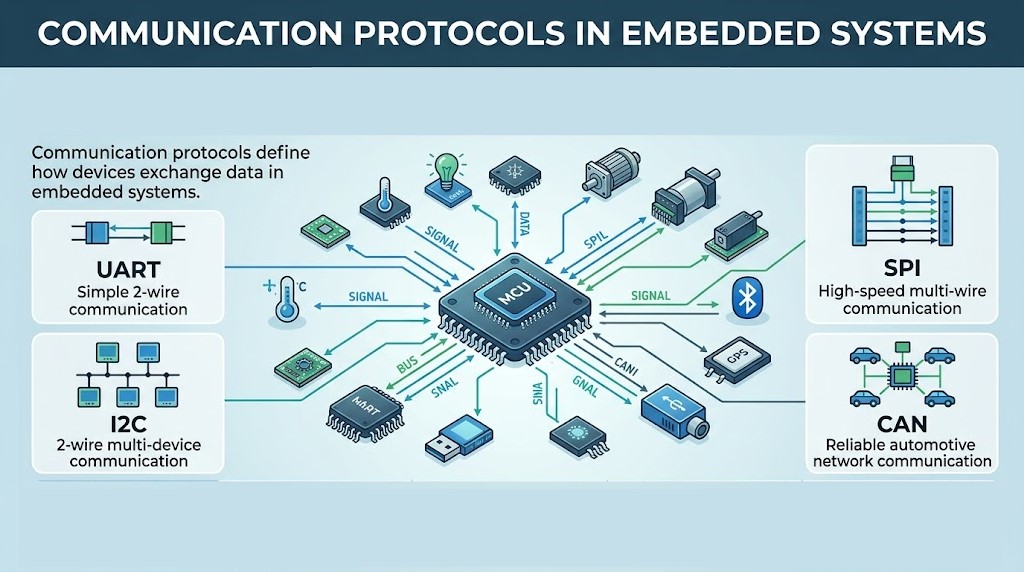
UART vs SPI vs I2C vs CAN: Embedded Communication Protocols Explained
Microcontrollers, sensors, displays, and actuators in an embedded system must exchange data reliably. A communication protocol is the set of rules that defines how that data is transmitted, received, and interpreted. Without agreed rules, devices could not understand each other.
Four serial protocols dominate embedded design: UART, SPI, I2C, and CAN. This guide explains how each works, compares them side by side, and helps you pick the right one.
Key takeaways
- UART: simple, asynchronous, point-to-point, no clock line.
- SPI: fastest of the four for short on-board links, full-duplex, one chip-select line per slave.
- I2C: two wires, many devices on one bus, addressed communication, moderate speed.
- CAN: robust, multi-master, differential bus built for noisy environments such as vehicles and factories.
- UART, SPI, and I2C are meant for short distances (on a board or between nearby boards). CAN covers tens to hundreds of metres.
Topics covered
- What is a communication protocol?
- Serial vs parallel communication
- UART
- SPI
- I2C
- CAN
- Comparison table
- How to choose a protocol
- Practical tips and common mistakes
- Applications
- Advantages and limitations
- FAQs
What Is a Communication Protocol?
A communication protocol is a standardized method that lets two or more devices exchange data in a structured way. It defines signal levels, timing, data format, and often addressing and error handling.
Protocols matter because they:
- Enable data exchange between devices
- Make communication accurate and reliable
- Reduce wiring complexity
- Support real-time operation
- Allow many devices to be integrated into one system
Serial vs Parallel Communication
- Serial communication sends data one bit at a time over few wires. UART, SPI, I2C, and CAN are all serial.
- Parallel communication sends several bits at once over many wires. It can be fast, but it needs more pins and routing and suffers from timing skew, so it is less common in modern embedded designs.
UART (Universal Asynchronous Receiver Transmitter)
UART is a simple serial protocol for asynchronous transmission, meaning there is no shared clock line. Both devices must be set to the same baud rate.
How UART Works
- Two signal lines: TX (transmit) and RX (receive), plus a common ground. Connect TX of one device to RX of the other.
- Each byte is wrapped in a frame so the receiver can find its boundaries.
Typical frame:
| Part | Purpose |
|---|---|
| Start bit | Signals the start of a frame (line goes low) |
| Data bits | Usually 8 bits, least significant bit first |
| Parity bit | Optional simple error check |
| Stop bit(s) | Returns the line high and marks the end |
Common baud rates include 9600 and 115200, and many microcontrollers support 1 Mbps or more.
UART Advantages
- Very simple, only two signal wires
- Easy to implement and cheap
- Widely supported and useful for debugging
UART Limitations
- Normally point-to-point (two devices). Multi-drop needs extra standards such as RS-485.
- Both ends must agree on baud rate, and clock mismatch causes errors.
- No built-in addressing or acknowledgment. Only an optional parity bit.
- Logic levels differ by standard: TTL/CMOS UART (3.3 V or 5 V) is not the same as RS-232 or RS-485 line levels. Never connect them directly.
UART Applications
GPS modules, Bluetooth and Wi-Fi modules, microcontroller-to-microcontroller links, serial debug consoles.
SPI (Serial Peripheral Interface)
SPI is a fast, synchronous, full-duplex protocol for short-distance links between one master and one or more slaves.
How SPI Works
Four signals:
| Signal | Meaning |
|---|---|
| SCLK | Clock from the master |
| MOSI | Master out, slave in |
| MISO | Master in, slave out |
| CS / SS | Chip select, one per slave, usually active low |
The master pulls a slave’s CS line low, generates the clock, and data moves in both directions at the same time on MOSI and MISO.
SPI has four modes (0 to 3), set by clock polarity and phase. Master and slave must use the same mode.
SPI Advantages
- Very high speed, often tens of MHz
- Simple hardware; command, address and dummy-clock overhead depends on the peripheral transaction
- Full-duplex and efficient for real-time data
SPI Limitations
- More wires: three shared lines plus one CS per slave
- No addressing, since the master chooses slaves with CS lines
- No built-in acknowledgment or error checking, so reliability checks are up to your software
- Short distance only, and no standard for multi-master operation
SPI Applications
SD cards, TFT, LCD, and OLED displays, ADCs and DACs, flash memory, and fast sensors.
I2C (Inter-Integrated Circuit)
I2C is a synchronous, addressed bus that connects many low-to-moderate-speed devices using just two wires.
How I2C Works
Two lines, both open-drain with pull-up resistors:
- SDA: serial data (bidirectional)
- SCL: serial clock
A transfer proceeds like this:
- The master sends a START condition.
- It sends the slave’s 7-bit address (or 10-bit) plus a read/write bit.
- The addressed slave replies with an ACK.
- Data bytes are transferred with an acknowledge clock after each byte. The receiver can signal ACK or NACK; a controller receiving data normally NACKs the final byte to end the read.
- The master sends a STOP condition.
Standard speeds are 100 kHz (standard), 400 kHz (fast), 1 MHz (fast-plus), and 3.4 MHz (high-speed mode).
I2C Advantages
- Only two wires, regardless of how many devices
- Addressing and acknowledgment are built in
- Easy to expand the system
I2C Limitations
- Slower than SPI, and half-duplex
- Pull-up resistor values matter, and too many devices or long wires add bus capacitance
- Address conflicts are possible when two devices share the same fixed address
- Multi-master is supported but rarely used because arbitration adds complexity
I2C Applications
Temperature and humidity sensors, EEPROM, real-time clocks, accelerometers and gyroscopes, small displays.
CAN (Controller Area Network)
CAN is a robust, message-based bus designed for reliable communication in vehicles and industrial systems. Nodes communicate without a host computer.
How CAN Works
- Two wires, CAN High and CAN Low, form a differential pair, which gives strong noise immunity. A CAN transceiver chip connects each microcontroller to the bus.
- The bus uses 120 Ω termination at both ends.
- Every message carries an identifier, not a destination address. The identifier also sets priority: when two nodes transmit at once, the lower ID wins arbitration without data loss.
- Messages include a CRC, acknowledgment, and error frames. Nodes detect errors and retransmit.
Classical CAN supports up to 1 Mbps with up to 8 bytes of data per frame. CAN FD raises the data rate (commonly several Mbps) and allows up to 64 bytes. Practical bus length falls as speed rises, from roughly 40 m at 1 Mbps to about 1 km at low speeds.
CAN Advantages
- Excellent noise immunity and reliability
- Multi-master with priority-based arbitration
- Strong built-in error detection and fault confinement
- Real-time, deterministic behavior for high-priority messages
CAN Limitations
- More complex than UART or I2C
- Needs a CAN controller and transceiver, so cost is higher
- Small payload per frame in classical CAN
- Bus setup (termination, bit timing) must be done correctly
CAN Applications
Cars and buses, industrial automation, robotics, medical equipment, aerospace systems.
Comparison of UART, SPI, I2C, and CAN
| Feature | UART | SPI | I2C | CAN |
|---|---|---|---|---|
| Type | Asynchronous serial | Synchronous serial | Synchronous serial | Asynchronous, message-based differential bus |
| Clock line | None | Yes (SCLK) | Yes (SCL) | None (bit timing recovered from data) |
| Signal wires | 2 (TX, RX) plus ground | 4+ (one CS per extra slave) | 2 (SDA, SCL) plus ground | 2 (CANH, CANL) |
| Typical speed | Up to about 1 Mbps and above | Often 10 to 50+ MHz | 100 kHz to 3.4 MHz | Up to 1 Mbps (classical), more with CAN FD |
| Duplex | Full | Full | Half | Half |
| Devices | 2 (point-to-point) | 1 master, many slaves | Many (addressed) | Many nodes (multi-master) |
| Addressing | None | Chip select | 7- or 10-bit address | Message identifier |
| Error handling | Optional parity | None built in | ACK bit | CRC, ACK, error frames, retransmit |
| Typical distance | Short (longer with RS-232/RS-485) | On-board, centimetres | On-board, up to about a metre | Tens to hundreds of metres |
| Complexity | Low | Low to medium | Medium | High |
How to Choose a Protocol
- Connecting just two devices, or need a debug port? Use UART.
- Need high-speed data (display, SD card, ADC)? Use SPI.
- Many slow sensors with few pins available? Use I2C.
- Noisy environment, long wires, or many nodes needing reliability? Use CAN.
- Check what your chip and peripherals support. Many sensors offer both I2C and SPI.
Practical Tips and Common Mistakes
- Share a common ground between devices on UART, SPI, and I2C.
- Match logic levels. A 3.3 V device and a 5 V device may need a level shifter.
- UART: cross TX and RX, and verify baud rate and frame format on both sides.
- SPI: confirm the mode (0 to 3), bit order, and maximum clock for each slave. Keep unused CS lines inactive.
- I2C: add pull-ups (commonly 2.2 kΩ to 10 kΩ, tuned to speed and capacitance), check for duplicate addresses, and keep wires short.
- CAN: terminate both ends with 120 Ω, use twisted pair, and set the same bit rate on every node.
- Use a logic analyzer or oscilloscope to debug timing and waveforms.
- Keep long off-board links off bare UART, SPI, or I2C, and use RS-485 or CAN with proper transceivers instead.
Applications of Communication Protocols
- Consumer electronics: phones, smart TVs, home appliances
- Automotive: engine control units, ABS, body electronics, and dashboards over CAN
- Industrial automation: PLC links, sensor networks, machine control
- IoT devices: smart sensors, home automation, wearables
- Medical systems: patient monitors, diagnostic machines, medical sensors
Advantages and Limitations
| Advantages | Limitations |
|---|---|
| Reliable, structured data transfer | Complexity grows with advanced protocols |
| Fewer wires than parallel links | Speed or distance limits depend on protocol |
| Real-time communication in many designs | Hardware and driver support varies |
| Easy integration of many devices | Compatibility issues between devices |
Frequently Asked Questions
What is the difference between UART, SPI, and I2C?
UART is asynchronous and point-to-point, SPI is a fast synchronous link using chip select lines, and I2C is a two-wire addressed bus supporting many devices at moderate speed.
Which is faster, SPI or I2C?
SPI, in general. SPI often runs at tens of MHz, while I2C tops out at 400 kHz to 3.4 MHz depending on mode.
Why does I2C need pull-up resistors?
I2C lines are open-drain, so devices only pull the line low. The pull-up resistors return it high.
Is CAN better than UART?
They serve different jobs. CAN is built for multi-node, noisy, long-distance networks, while UART is simplest for a direct link between two devices.
Can SPI have multiple masters?
It is possible in special arrangements, but standard SPI assumes a single master.
What is CAN FD?
CAN with Flexible Data-rate. It allows faster data phases and up to 64 bytes per frame, compared with 8 in classical CAN.
Can I run UART over long cables?
Not reliably at TTL levels. Use RS-232 or, better, RS-485 with the right transceivers.
Conclusion
UART, SPI, I2C, and CAN are the core building blocks of embedded communication. UART is simple and ubiquitous, SPI is fast, I2C connects many devices with two wires, and CAN delivers reliable multi-node networking in harsh environments. Choose by speed, number of devices, distance, noise, and cost, then confirm timing, voltage levels, and wiring in the datasheets.

Comments
Comments are currently closed.